Turn your BlockHorse into a brick model you can really build
Pick any of the 260 BlockHorses. You get a 3D build animation, step-by-step instructions and your parts list, ready to order. One sprite pixel is one stud wide and one brick tall.
BlockHorse
Nothing leaves your browser. The model, the instructions and the video are made on your device: no upload, no server, no AI.
Your horse
Built and checked in your browser
Drag to turn · pinch or scroll to zoom
More info
Instructions
One page per layer · flip through them here
Buy the bricks
You order and pay directly on LEGO or BrickLink. Nothing goes through this site.
or to buy everything there
Buy at LEGO in 3 steps
- ✓Your LEGO list is downloadedSaved to your Downloads
- 2Go to Pick a BrickLEGO’s own shop for single pieces. Uploading a list isn’t available in every country.Open Pick a Brick ↗
- 3Click “Upload List”, then choose your fileIt’s next to the search bar. LEGO adds every piece it has to your bag and lists any it couldn’t add: get those on BrickLink.

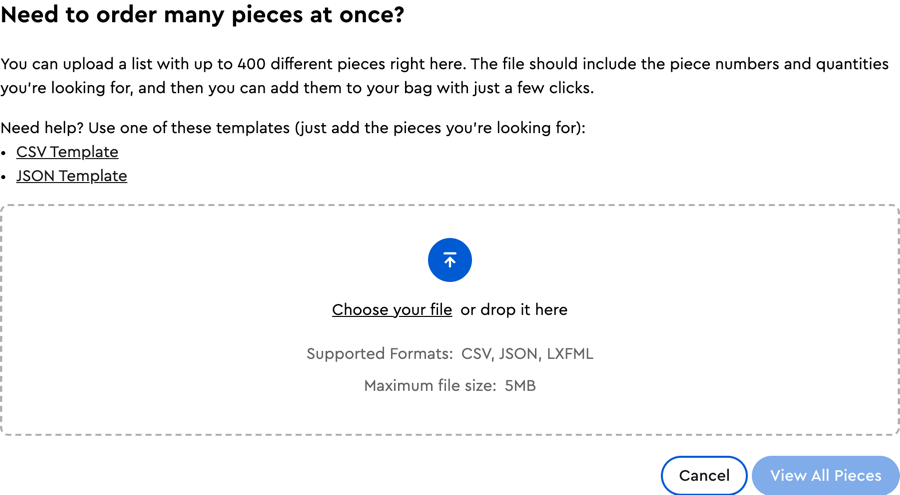
Screenshots of the Pick a Brick website, for guidance.
How ordering works
LEGO Pick a Brick is LEGO’s own shop for single pieces. “Buy at LEGO” downloads your list (). On Pick a Brick, click “Upload List”, choose the file, then check your bag: LEGO lists any piece it couldn’t add. Uploading a list isn’t available in every country: check Pick a Brick for yours.
BrickLink is a marketplace of independent shops selling single pieces, including the ones LEGO doesn’t sell or has out of stock. “Buy on BrickLink” copies your list. Sign in (with a LEGO account), open Want → Upload, choose “Upload BrickLink XML format”, paste, then open the new wanted list and use “Buy All” to find shops.
Files: · ·
Questions
How is the sprite turned into bricks?
One pixel of the 32 × 32 sprite is one stud wide and one brick tall, on a 32 × 8 base of two crossed plate layers. The model is 6 studs deep: the legs come in two pairs, the body is full depth, the head 4 studs, the tail and mane 2 studs, and each wing is one stud thick on the outside. The front of the model, the side facing you in the instructions, is the side the sprite shows. Every horse of a species (horse, pegasus, unicorn, winged unicorn) has the same build; only the colours change.
Where do the colours come from?
Each trait (coat, mane, tail, eyes, shoes, horn, wings) is a CSS colour name in the token’s original SVG. It is matched to the nearest real brick colour with CIEDE2000, and traits that touch keep different brick colours when their original colours differ. “Only colours LEGO sells” picks, per trait, the nearest colour LEGO Pick a Brick sells in every part that trait uses. The model itself never changes.
Can I really build it?
Every model is checked by computer: all pieces are standard parts in real colours, every piece is attached to the base (0 floating), no two pieces overlap (0 collisions) and the centre of mass sits over the base. No piece larger than 1 × 1 hangs on a single stud. A 1 × 1 brick always sits on one stud, so the steps of a unicorn’s horn are held by one stud each, by design. Models have not been built with real bricks yet, so treat your first build as a test.
What is the jumper plate?
A 1 × 2 plate with a single stud in the middle (BrickLink part 15573). The horn sits on one so that it’s centred on the head, half a stud off the grid.
How do I get the bricks?
Under “Buy the bricks”: download the Pick a Brick file and upload it on LEGO Pick a Brick (“Upload List”), and/or copy the BrickLink list and upload it on BrickLink (Want → Upload). The site tells you how many lots LEGO sells. You order and pay on those sites, never here.
Is this official?
No. BlockHorse to Bricks is a free, open-source, unofficial fan project, not affiliated with, sponsored or endorsed by the LEGO Group or BrickLink. It sells nothing and earns nothing: no affiliate links, no commission, no tracking. It is based on Punk to Bricks by John Karp. BlockHorses are at blockhorses/BlockHorses.